
Should you stay with the WordPress block editor or install a page builder? The question comes back with every new project, and ready-made answers are rarely useful.
Here are the criteria I use with my clients to decide, with the risks of each choice.
What is the difference between Gutenberg and a builder?
Gutenberg is the editor built into WordPress. A builder is a plugin or theme that replaces the content editor with a visual layout tool, such as Elementor or Divi.
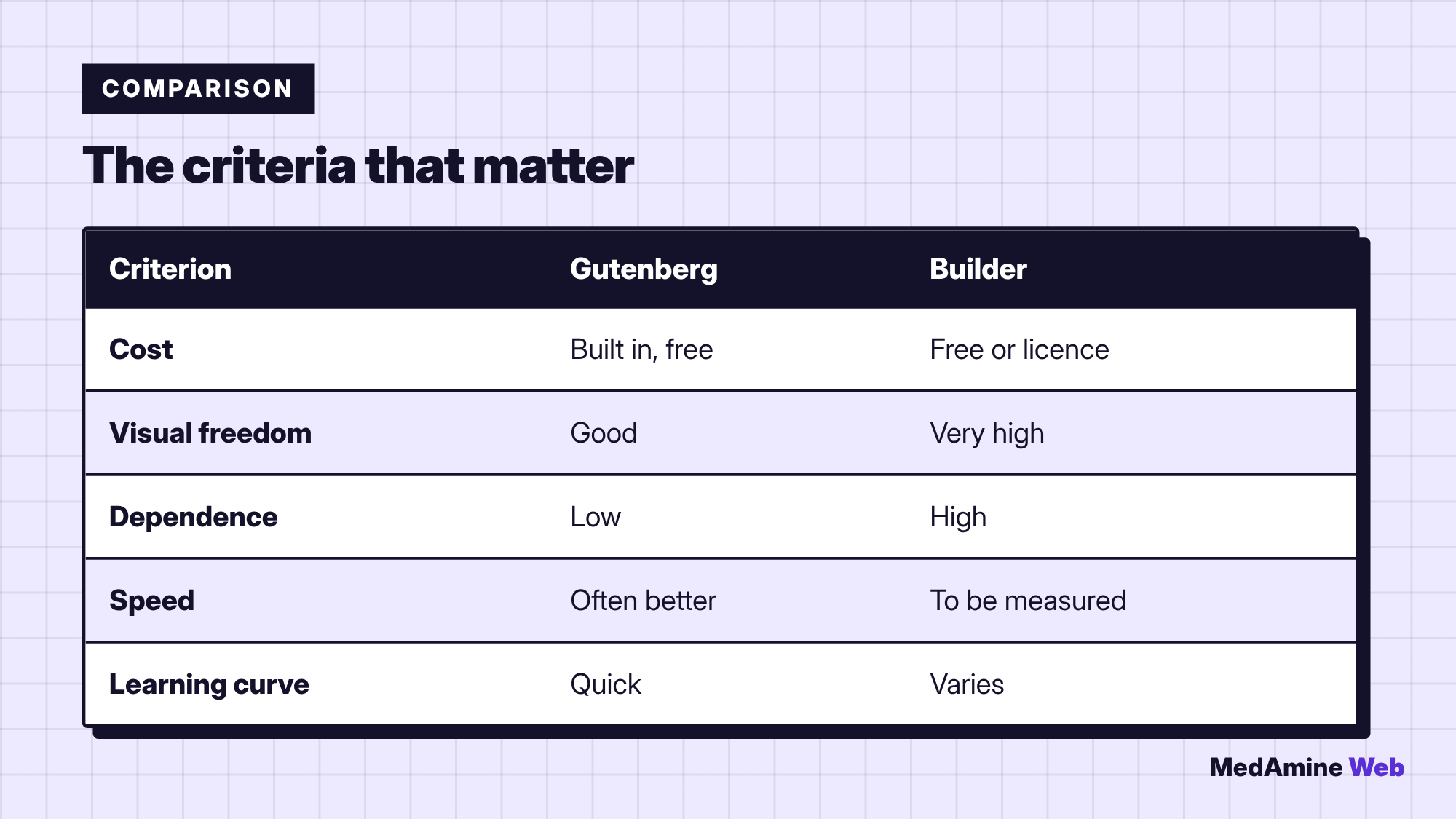
Both let you compose pages without coding. The difference lies in visual freedom, dependence and page weight.
Is Gutenberg enough for most sites?
For content pages, a blog or a classic brochure site, yes. Blocks, patterns and block themes cover most needs. I describe the tool in the Gutenberg guide.
Its advantage: it is free, built in and maintained together with WordPress.
What does a page builder bring?
More layout freedom, a live preview, ready-made templates and often a header and footer builder.
The free Elementor, for example, offers more than forty widgets, while features such as the Theme Builder or forms are reserved for Pro, according to its official page.
What are the risks of a builder?
- Dependence: leaving the tool often means redoing layouts.
- Heavier pages, depending on how they are built.
- A recurring licence cost for advanced features.
- One more update to watch on every site.
What is the impact on speed?
It depends on the page, the hosting and the configuration. A well tuned builder can stay fast, and Gutenberg can become slow with too many plugins.
The only reliable method is to measure. The usual causes are detailed in why WordPress is slow.
Who will edit the site after delivery?
It is a decisive question. If a non-technical team has to change layouts, a builder can help. If it only edits text and images, Gutenberg is leaner.
How do you choose in practice?
- List the pages and layouts you need.
- Build the most complex one in Gutenberg to see what is missing.
- Try a builder only if Gutenberg is not enough.
- Measure the speed of the final page before deciding.
Can you change your mind later?
You can, but it costs time, especially if the site has many pages built with the builder. It is better to decide before the content is created.
Which cases favour a builder?
A builder makes sense for a very visual landing page, for repeated layouts that non-developers must edit, or when a ready-made template saves days. In those cases, the dependence has a price you accept knowingly.
Conversely, for a blog or a services site, the block editor and a good theme are almost always enough. I also offer to build your WordPress site with this lean approach when it fits.
Whatever you choose, document it. Write down which builder, which version and which licence the site uses, so that whoever takes over can maintain it without guessing.
What now?
What you can do today:
- List the three most complex layouts of your site
- Try them in the block editor before looking for a builder
- Note who will edit the site after it goes live
Dig deeper: WordPress Website Development