
The meta description is the short text that appears under your page title in search results. It does not lift a page on its own, but it often decides the click.
Here is how to add a WordPress meta description, how to write it and what Google really does with it. My admin is in French, so the screenshots show French labels. The English names are given in the text.
What is a meta description?
It is a tag placed in the invisible part of a page, summarising its content. Google specifies that it is written as a meta tag named description, in the head of the page.
On WordPress you do not need to touch the code: an SEO plugin adds the field in the editor and inserts the tag for you.
The visitor never sees this tag on the page itself. They read it only in search results, or sometimes in the preview of a link shared on a social network.
Does Google use the meta description?
Only sometimes. According to Google’s documentation, the displayed snippet mostly comes from the page content, and the meta description is used when it describes the page better than the visible text.
Google may therefore write its own description. That does not make the tag useless: a good description remains the best chance to control what people read.
Since Google picks the most relevant snippet for each search, a precise description about the topic of the page is more likely to suit it than a vague text.
How do you add a meta description with Yoast SEO?
- Install and activate Yoast SEO from Plugins > Add New.
- Open the post or page to edit in the editor.
- Scroll to the Yoast SEO box and open the search appearance part.
- Fill in the Meta description field, then save.
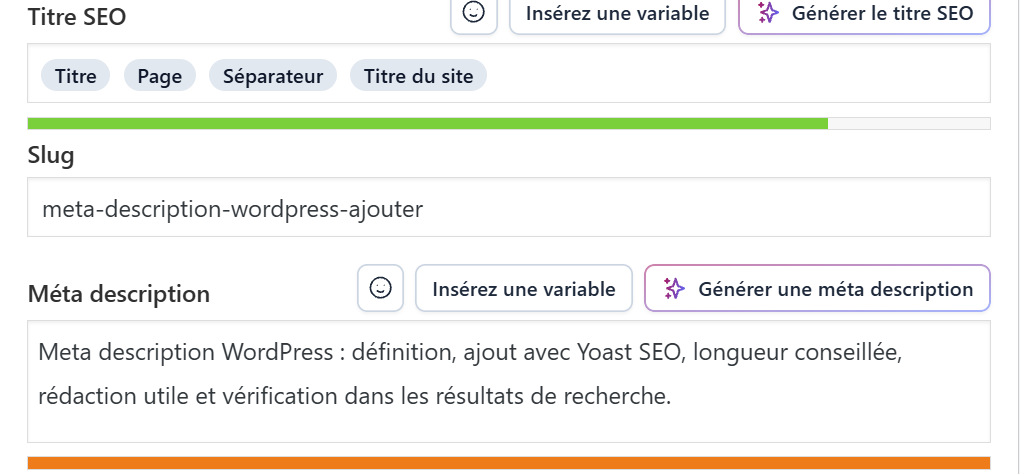
The screenshot shows the SEO title, the page address and the meta description field, with its length bar. My guide to setting up Yoast SEO covers the rest of the plugin.
How long should a meta description be?
Google sets no official length limit. It truncates the snippet depending on the device width, as its documentation states.
I aim for about 140 to 155 characters, which fits most displays. Put the most useful information at the start of the text, in case the end gets cut.
The colour bar of Yoast SEO helps you stay in that range. It is a comfort marker, not a Google rule, so do not sacrifice meaning to make it turn green.
How do you write a good meta description?
- Summarise the page in one or two sentences saying what the reader will find.
- Use the main keyword naturally, without repeating it.
- Add a concrete detail such as a price, a duration or a reliable figure.
- Write a unique version for each important page.
Google discourages keyword lists, which do not explain the page and are shown less often. It recommends summaries that describe the whole content.
For a post, you can mention the date or the author. For a product, the price and the brand give an immediate benchmark, according to the examples in Google’s documentation.
What if several pages have the same description?
Repeated descriptions across a site do not help readers, according to Google. If time is short, handle the home page, your services and your most visited posts first.
For sites with many pages, such as a shop, a carefully written automatic template is better than an empty field, provided it stays readable and varied.
How do you check the meta description of a page?
Right-click the page, display the source code and look for the tag named description. You can also search for your page on Google and read the displayed snippet.
If the snippet differs from your text, Google chose another one. Check that the page really answers the query typed, and rewrite your description around that answer.
Allow a few days after a change: Google must crawl the page again before showing the new version. My guide to getting a WordPress site indexed explains how to speed that up.
What is the difference between a meta description and an SEO title?
The SEO title is the clickable blue link, the meta description is the text that goes with it. Both work together: the title catches the eye, the description convinces people to click.
My technical SEO checklist puts these two tags among the first points to check on a WordPress site.
When should you call a professional?
Get help if your site has hundreds of pages without a description or if your snippets are systematically rewritten. I fix these points with the WordPress SEO consultant service.
What now?
What you can do today:
- Search for your home page on Google and read the snippet that is displayed.
- Open your most visited post and check the meta description field in the editor.
- Write a unique description under 155 characters for three important pages.
Dig deeper: WordPress SEO Consultant