

Hosting at a few euros a month is perfectly fine for a lot of sites. The catch is that some teaser prices get paid for later, in slowness, outages or a much higher bill at renewal time.
Here is what I check before recommending a budget plan to a client, and the kind of host I use myself for reasonably sized WordPress sites.
Is cheap web hosting a good idea?
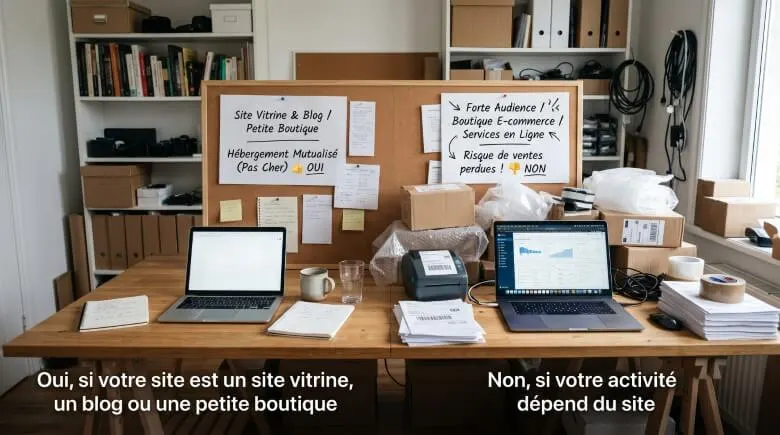
Yes, if your site is a business website, a blog or a small, low-traffic store. Shared hosting is enough in that case: several sites share one server, which keeps the price down.
No, if your business depends on the site (a store with lots of orders, a big audience, online services). Saving a few euros a month can cost you a lot in lost sales on peak days.
What are the traps of budget hosting?
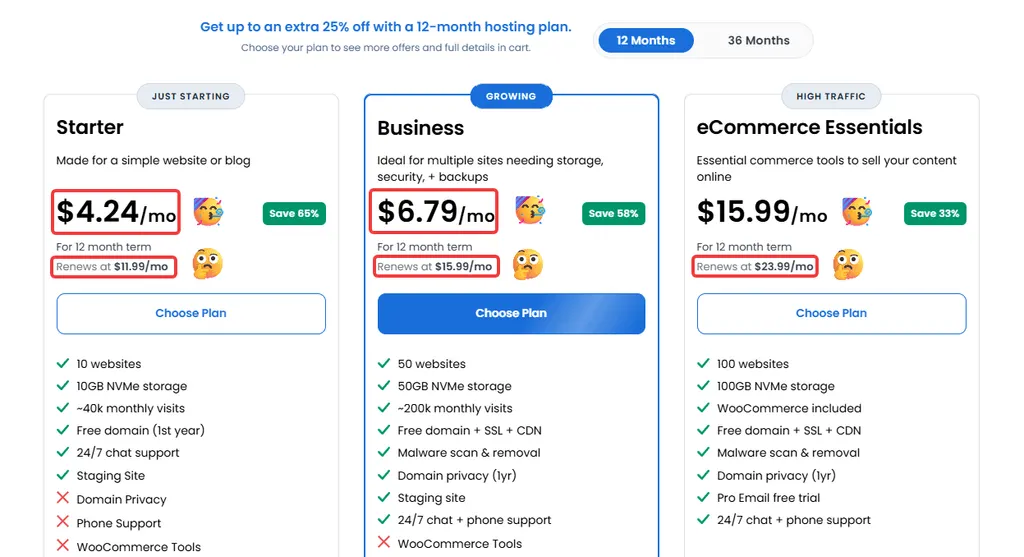
- The teaser price: the advertised rate often applies only to the first term, and renewal costs more.
- Long commitments: the best discounts require paying 24 or 48 months upfront, which hurts if you change your mind.
- Shared resources: CPU, memory and process counts are capped, and a resource-hungry neighbour can slow you down.
- Paid extras: backups, certificates, email or the domain aren’t always included at the same level across plans.
- Slow support: when the site is down, a chat that takes hours to reply costs more than the price difference.
What should good WordPress hosting offer, even on a budget?
WordPress.org publishes its requirements: PHP 8.3 or higher, MariaDB 10.11 or higher (or MySQL 8.0 or higher), and a host that supports HTTPS. Older versions still work but have reached end of life and can leave the site open to vulnerabilities.
- A recent PHP version that you can switch yourself from the control panel.
- A free HTTPS certificate that renews automatically.
- Automatic backups you can restore in one click.
- SFTP access, and ideally SSH, so you can work properly.
- A server cache to speed up pages without piling on plugins.
Which host should you choose for a low-budget WordPress site?
I regularly use Hostinger (opens in a new tab) for business websites and small blogs. It appears on WordPress.org’s list of recommended hosts, which notes that the selection is discretionary and doesn’t replace your own comparison.
What I like about this kind of plan is the few-clicks WordPress install and a cache built for WordPress. Details change by plan and period, so always check exactly what’s included on the checkout page.
| Criterion | Entry-level shared hosting | Higher plan or VPS |
|---|---|---|
| Typical use | Business website, blog | Online store, large audience |
| Resources | Shared with other sites | Higher or dedicated |
| Price | Lowest | Higher |
| Technical management | Handled by the host | Often more configuration |
How do you check the real price before paying?
- Choose the term you actually want, then read the total due today.
- Find the renewal price in the terms or the order summary.
- Check the options ticked by default, as they often get added to the cart.
- Read the refund policy, how long it lasts and what it excludes.
- Put the renewal date in your calendar so you can compare again before it comes round.
Should you commit for several years?
A long commitment lowers the monthly price, but it ties your budget to a host you don’t know yet. My advice: start with a short term to test performance and support, then commit for longer once the site is stable.
What if the site gets slow on budget hosting?
Measure first. A slow site is more often down to oversized images or unneeded plugins than to the host. I go through the causes in Slow WordPress site: 12 causes and fixes.
If the server really is the bottleneck, move to a higher plan with the same host before migrating everything.
When should you call in a professional?
You can choose hosting on your own for a simple site by following the checklist above. Get help if you’re moving an existing site, if traffic is high or if you don’t know why the site is slowing down.
I can migrate your WordPress site with no downtime and no loss of rankings.
What now?
What you can do today:
- Look at your current invoice and write down the renewal price.
- Check the PHP version in your host’s control panel.
- Test restoring a backup to make sure it works.
Dig deeper: WordPress Migration